Place an order
Authenticate, choose an account, and send an order to market through the Order Management System.
Flow
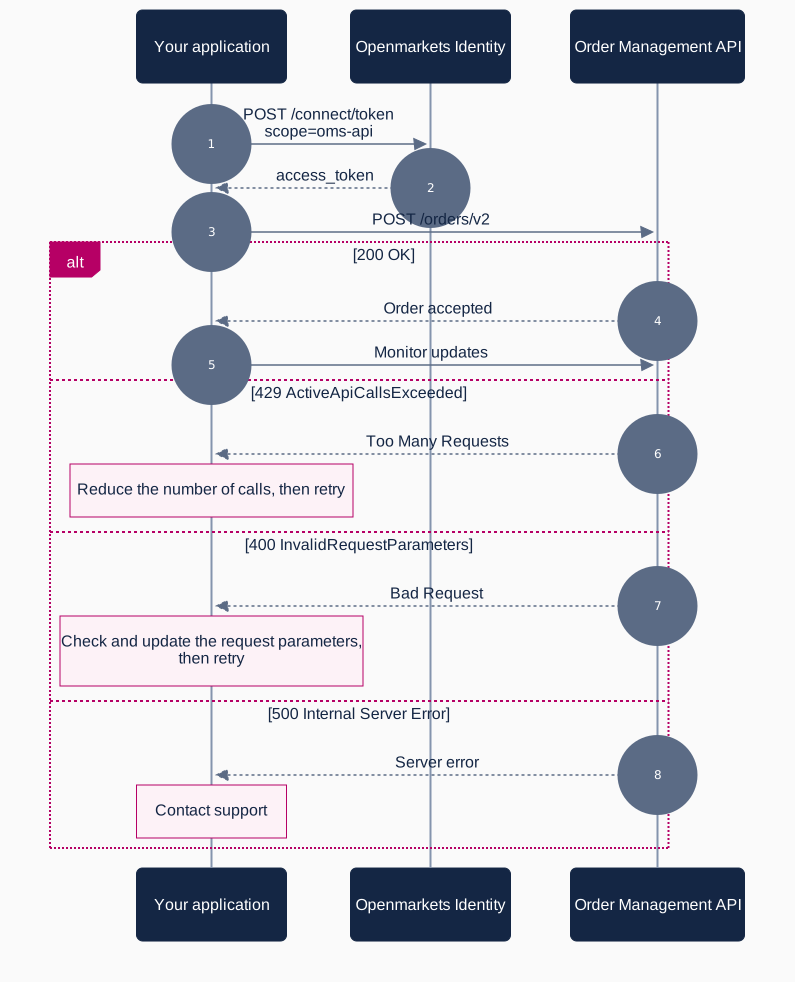
What you need
| Requirement | Detail |
|---|---|
| Scope | oms-api |
| API | Order Management |
| Base URL (test) | https://test-oms-api.openmarkets.com.au/ |
Steps
- Get a token. Request an access token with the
oms-apiscope. See Authentication. - Select an account.
GET /accounts/v1lists the accounts available to you. UseincludeInactiveif you need inactive accounts as well. - Create the order. Send the order with its account code, security code, side, volume, price, pricing instruction and lifetime. Invalid values are rejected with parameter-level codes such as
InvalidLifetimeorInvalidOrderPrice. - Handle vetting. An accepted order may still be held by a vetting rule. Retrieve the order with
GET /orders/by-number/v4and checkorderStateandstateDescription. See post-creation vetting errors. - Track the order. Poll the order endpoints, or subscribe to OMS streaming for live fills and state changes.
A 201 response means the order was accepted by the OMS, not that it reached the market. Orders can be held for authorisation. Outside market hours they are authorised the next business day before 10am. Always read orderState before treating an order as live.