Authentication
Every Openmarkets API is protected by OAuth2. Your application exchanges a client ID and secret for a short-lived bearer token, then sends that token on each request.
Credentials are issued by Openmarkets during onboarding. There is no self-service portal. If you do not have a client_id and client_secret yet, contact us.
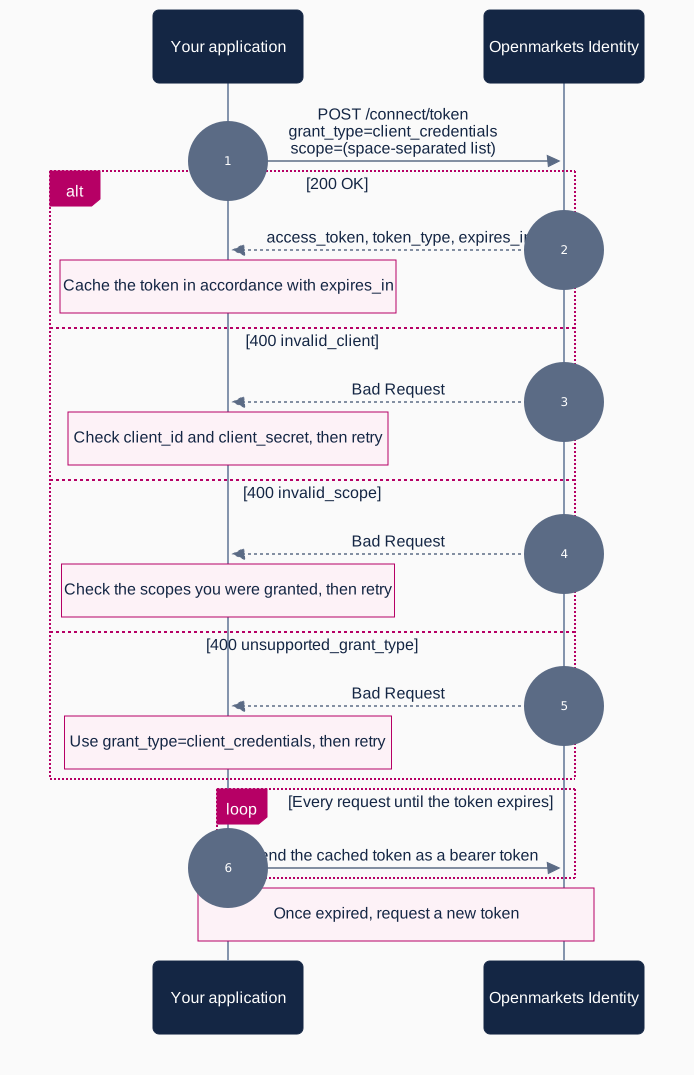
Client credentials grant
Openmarkets allows your application to issue authenticated requests on behalf of the application itself, using the OAuth2 client credentials grant.
With this grant type your application has no authenticated user context, so requests to endpoints that require a user will be rejected as unauthorised.
Token endpoints
| Environment | URL |
|---|---|
| Test | https://stage-identity.openmarkets.com.au/connect/token |
| Production | https://identity.openmarkets.com.au/connect/token |
The request is authenticated with HTTP basic authentication, where the client_id is the username and the client_secret is the password.
Requesting a token
Request the scopes you need as a space-separated list.
curl -X POST 'https://stage-identity.openmarkets.com.au/connect/token' \
  -u '{client_id}:{client_secret}' \
  -H 'Content-Type: application/x-www-form-urlencoded' \
  -d 'grant_type=client_credentials&scope=market-data-api%20news-api%20oms-api'
var authUrl = "https://stage-identity.openmarkets.com.au/connect/token";
var clientId = "YOUR_CLIENT_ID";
var clientSecret = "YOUR_CLIENT_SECRET";

var postData = "grant_type=client_credentials&scope=market-data-api%20news-api%20oms-api";

var client = new HttpClient();

client.DefaultRequestHeaders.Authorization = new AuthenticationHeaderValue(
    "Basic",
    Convert.ToBase64String(Encoding.ASCII.GetBytes($"{clientId}:{clientSecret}")));

var result = await client.PostAsync(
    new Uri(authUrl),
    new StringContent(postData, Encoding.UTF8, "application/x-www-form-urlencoded"));

var tokenJson = await result.Content.ReadAsStringAsync();
const credentials = Buffer.from(`${clientId}:${clientSecret}`).toString('base64')

const response = await fetch('https://stage-identity.openmarkets.com.au/connect/token', {
  method: 'POST',
  headers: {
    Authorization: `Basic ${credentials}`,
    'Content-Type': 'application/x-www-form-urlencoded',
  },
  body: new URLSearchParams({
    grant_type: 'client_credentials',
    scope: 'market-data-api news-api oms-api',
  }),
})

const token = await response.json()
import requests

response = requests.post(
    "https://stage-identity.openmarkets.com.au/connect/token",
    auth=(client_id, client_secret),
    data={
        "grant_type": "client_credentials",
        "scope": "market-data-api news-api oms-api",
    },
)

token = response.json()
Token response
The access_token is a signed JWT. Treat it as opaque, send it verbatim, and do not depend on its contents. The sample below is truncated for readability.
{
    "access_token": "eyJhbGciOiJSUzI1NiIsImtpZCI6IkIzMzk2NDk4RUM2Njc3QkZBMjVFRkVENzA1RUQ5OTQ0IiwidHlwIjoiYXQrand0In0.eyJpc3MiOiJodHRwczovL2lkZW50aXR5Lm9wZW5tYXJrZXRzLmNvbS5hdS8iLCJuYmYiOjE3ODgyMTg0OTksImlhdCI6MTc4ODIxODQ5OSwiZXhwIjoxNzg4MjIyMDk5LCJhdWQiOlsibWFya2V0LWRhdGEtYXBpIiwiaHR0cHM6Ly9pZGVudGl0eS5vcGVubWFya2V0cy5jb20uYXUvcmVzb3VyY2VzIl0sInNjb3BlIjpbIm1hcmtldC1kYXRhLWFwaSJdLCJjbGllbnRfaWQiOiJkZW1vLWZyb250ZW5kIiwiY2xpZW50X2FhdCI6IjE3MTAyMDE0MDEiLCJjbGllbnRfYnVzaW5lc3NfaWQiOiIxIn0.NFkQ0cI5C5sWiu23wPso297Ywoi8M2njO1N-4hcQeP70NlJx1BpW87wXpL_SlUR6...",
    "expires_in": 3600,
    "token_type": "Bearer",
    "scope": "market-data-api news-api oms-api"
}
| Field | Description |
|---|---|
access_token | The value used as the bearer token to authorise requests. |
expires_in | Lifetime of the token in seconds. The example above expires one hour after it was issued. |
token_type | The type of token obtained. Always a bearer token. |
scope | The scopes actually granted, space separated. This can be narrower than what you requested. |
Cache the access_token for the duration given by expires_in and reuse it across requests. Rate limits apply to the token endpoint as well as the APIs.
Using the token
Send the token in the Authorization header on every request:
curl 'https://test-oms-api.openmarkets.com.au/accounts/v1' \
  -H 'Authorization: Bearer {access_token}'
API base URLs
The token endpoint above is shared by every API. The APIs themselves are not: they are separate services on separate hosts, and several are on entirely different domains. Send each request to the host for that API.
| API | Test | Production |
|---|---|---|
| Market Data | https://test-market-data-api.openmarkets.com.au/ | https://market-data-api.openmarkets.com.au/ |
| Order Management (OMS) | https://test-oms-api.openmarkets.com.au/ | https://oms-api.openmarkets.com.au/ |
| OMS Streaming | https://test-oms-streams-api.openmarkets.com.au/ | https://oms-streams-api.openmarkets.com.au/ |
| News | https://test-news-api.openmarkets.com.au/ | https://news-api.openmarkets.com.au/ |
| Account Opening | https://stage-api.openmarkets.com.au/ | https://api.openmarkets.com.au/ |
| Account Management | https://stage-api.openmarkets.com.au/ | https://api.openmarkets.com.au/ |
| Order Advice | https://stage-api.openmarkets.com.au/ | https://api.openmarkets.com.au/ |
| Back Office Data | https://api.uat.openbroker.io/ | https://api.openbroker.io/ |
| Contract Notes | https://api.uat.openbroker.io/ | https://api.openbroker.io/ |
| Portfolio Updates | https://api.uat.openbroker.io/ | https://api.openbroker.io/ |
Error formats differ along the same lines. Market Data, News and Order Management return the Openmarkets error envelope documented on their own error pages. Account Opening returns an RFC 7807 problem document, and the back office APIs return a ConnectError body. Check the OpenAPI reference for the API you are calling.
If you have been given a dedicated sandbox, the correct URL is provided to you as part of onboarding.
Scopes
A token only grants access to the scopes it was issued with. Request every scope your application needs in a single token, or request separate tokens per API.
| API | Scope |
|---|---|
| Account Opening | accounts-submissions |
| Account Management | accounts-read, accounts-manage |
| Order Advice | advice-read |
| Back Office Data | back-office-api |
| Contract Notes | back-office-api |
| Portfolio Updates | back-office-api |
| Market Data | market-data-api |
| News | news-api |
| Order Management (OMS) | oms-api |
| OMS Streaming | oms-streams-api |
Requesting a scope that is not included in your plan returns a 400 invalid_scope error. Contact support if you need a scope added.