Open an account
Submit a new client account application to Openmarkets and track it through to an active account.
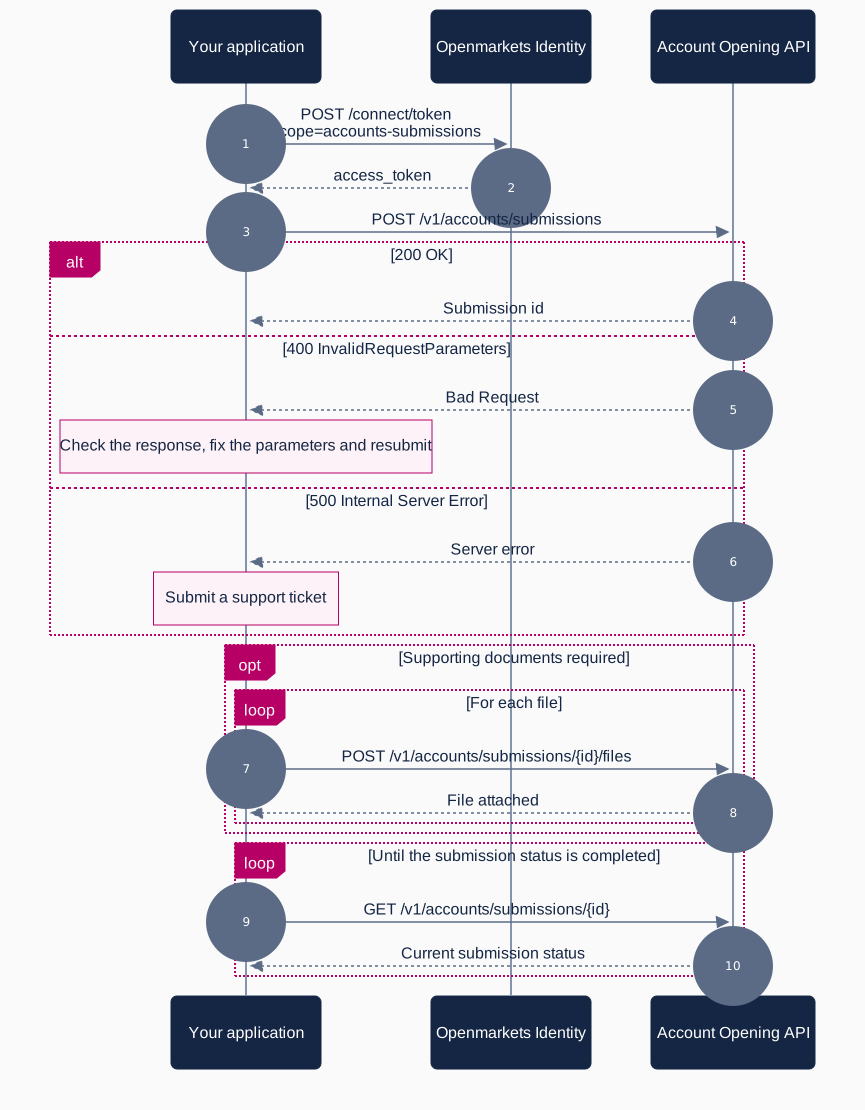
Flow
What you need
| Requirement | Detail |
|---|---|
| Scope | accounts-submissions to submit, accounts-read to read the resulting account |
| API | Account Opening, then Account Management |
| Base URL (test) | https://stage-api.openmarkets.com.au |
Steps
- Submit the application.
POST /v1/accounts/submissionswith the applicant details and a uniqueIdempotency-Keyheader. The response carries thesubmissionIdyou use for everything that follows. - Attach supporting documents.
POST /v1/accounts/submissions/{id}/filesfor each identification or supporting file the application requires. - Track progress.
GET /v1/accounts/submissions/{id}returns the current state of a single submission, andGET /v1/accounts/submissionsreturns a paginated list if you are reconciling many at once. - Read the resulting account. Once the submission completes, the account is available through the Account Management API at
GET /v1/accounts/{accountNumber}.
Submission and account are separate resources. A submission records the application and its outcome; the account is what you trade against afterwards.
Related
- Account Opening API: full reference for submissions and file uploads
- Account Management API: read account details and transfer holdings between HIN and SRN